

ERP vs MES: Key Differences and When to Extend Your Existing ERP


Enterprise Resource Planning (ERP) handles the big-picture planning and business logic for the whole company. Manufacturing Execution System (MES), on the other hand, takes care of the hands-on execution of operations. So if your company already runs an ERP, do you actually need a separate MES on top of it?
It depends on how complex your processes are, how precise your data needs to be, and what your existing system modules already handle. In practice, the line between the two often gets blurry.
At Dinamicka Development, we regularly help businesses build and integrate digital solutions of any complexity – from web applications and complex ERP systems that automate business processes to specialized mobile apps.
Our experience shows that many enterprises face the problem: ERP is already implemented, but employees still use traditional paper reports and aren’t in any hurry to digitize.
Let’s break down the difference between MES and ERP, figure out how they work together, and help you pick the right next step – whether that’s implementing an MES, setting up data exchange between systems, or just extending what your current ERP can already do.
What’s the difference between MES and ERP?
ERP vs MES sounds like a choice between two rival products, but it isn’t quite that. The two systems work at different levels, and while some plants run both, others get by with one. People usually search for “MES vs ERP” in one of two situations: they have neither system yet and want to know what each one does, or they already run an ERP and wonder whether an MES would add anything on top. So, let’s start from the clear definitions below.
Enterprise Resource Planning (ERP) is a system for managing a company’s business processes. It brings together finance, procurement, customer orders, overall inventory levels, and cost calculations.
Manufacturing Execution System (MES) works purely at the production level. It tracks and directs what operators and equipment are doing in real time, right as products are being made.
Put simply: ERP plans what needs to get made and when, to meet business goals. MES controls how that process actually plays out on the shop floor, minute by minute.
What Does an ERP System Actually Do on the Shop Floor?
ERP is the main source of truth for a company’s entire financial and commercial side. It takes in sales orders, calculates raw material needs (MRP), generates purchase orders, and works out cost of goods.
Most modern ERPs come with their own production modules built in. They can hold specifications, manage schedules, and keep basic track of work-in-progress (WIP).
But here’s the catch. The level of detail and the speed at which these modules react to what’s happening on the floor are both pretty weak. A lot depends on the vendor and how the system’s configured. For day-to-day operational work, that’s often just not enough.
So What Is MES, Exactly?
MES is software built for direct, hands-on control of production at the workstation level. It logs events on the line, tracks actual material consumption, flags deviations from the process, and traces the exact route each batch takes through production.
And here’s the important part: MES doesn’t just pull data from machines and automation. A huge chunk of the information comes from the operators themselves – entered through shop-floor terminals, barcode scanners, and quality control checkpoints.
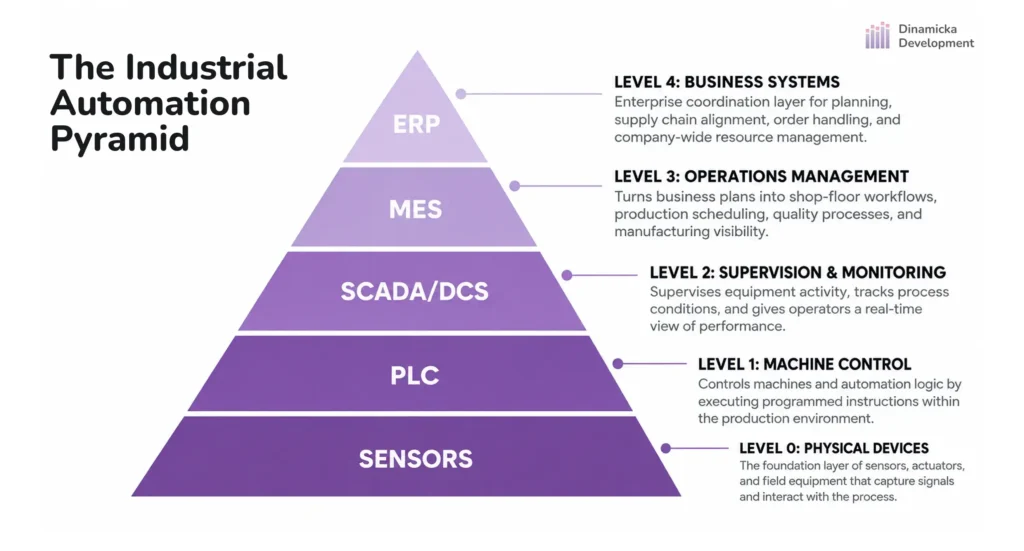
Looking at the international ISA-95 model, the division of roles breaks down like this:
- Level 4 (ERP): strategy, money, planning, and logistics.
- Level 3 (MES): operational control of processes on the shop floor.
- Levels 1–2 (PLC / SCADA): ground-level automation and sensors on the equipment itself.
The way it works is that MES acts as a “bridge” between the business layer up top and the hardware down below. It takes the big-picture plans coming from ERP and translates them into concrete tasks for each shift.
How Do ERP and MES Work Together?
MES and ERP do not compete with each other; rather, they work together. ERP generates production tasks based on customer orders and forwards them downstream, while MES receives these tasks, coordinates their execution on the shop floor, and reports the actual results back upstream.
That’s why an ERP vs MES comparison only goes so far: the two systems sit on different levels and hand work to each other.
Looking for a way to automate production?
Schedule a free consultation with our business development manager to get expert advice on IT solutions.
Book a Free ConsultationAreas and Content of Data Exchange
To prevent the financial system from being overwhelmed by millions of minor transactions from production lines, a clear division of responsibilities is established between systems:
Please note: High-frequency detailed data – such as temperature graphs from sensors or meter readings recorded every second – remains within the MES or SCADA system. Only summary metrics by operation or shift are forwarded to the ERP system.
How It Works: An Example from One Batch
To give you a clearer understanding of the process sequence, here is a specific example of how the Manufacturing Execution System and ERP exchange data on a live production line:
- The ERP system pushes a task down the line. It sends Order No. 8042 to the MES: produce 1,000 “A” parts. It includes the BOM specification (standard: 1,050 kg of raw materials).
- MES runs the production floor. The shift is in progress. MES provides step-by-step instructions to the operator, monitors the machines, and immediately identifies 20 defective units during an intermediate inspection.
- MES reports the results to upper management. The batch is ready. MES generates the final summary: 980 acceptable parts were produced, 20 were written off as scrap, 1,040 kg of material was used, and 14.5 person-hours were recorded.
- The ERP system records the results. It accepts the 980 parts into the finished goods warehouse, writes off the raw materials from inventory, accounts for deviations from standards, and closes order No. 8042.
Do You Actually Need a Separate MES?
If you already run an ERP, the MES vs ERP question is less about which system is better and more about what your current one leaves uncovered.
The biggest mistake a lot of managers make is blaming every data mess on “not having an MES.” Sometimes the delays have nothing to do with software at all. The real reason is usually simpler: processes that don’t line up with each other, a plain lack of discipline on the floor, or the fact that half the features in the ERP you already paid for are just sitting there gathering dust.
When Your Current ERP Is Already Enough
If your product range is fairly stable, your production routes are well understood, and you track costs at the batch or shift level, a standard ERP is usually more than enough.
Before you go shopping for expensive new software, answer these three questions honestly:
- Have you actually squeezed everything out of your current ERP’s production module? Set up the specs, work centers, and routing cards properly?
- Why aren’t people on the line entering data? Is it a clunky interface, no decent tablets or terminals to work with, or did nobody ever bother training them?
- Could simple automation at the ground level fix this? Barcode scanners or basic mobile workstations, say.
If it turns out the problem’s really about how processes are organized or some sloppy configuration, fixing up your ERP will cost a fraction of what a brand-new IT project would, and take way less time too.
When the Real Problem Is Data Living in Silos
Here’s a situation that comes up constantly: the numbers are technically being collected, sure, but they’re scattered across separate Excel sheets, local programs tied to individual machines, or just stuck in the heads of shop foremen. Then someone has to manually retype all of it into the ERP.
This isn’t really about missing an MES. It’s a gap between systems, or the lack of one specific tool to bridge it. A straightforward integration, a custom connector, or a small module often does the trick, without you having to buy a heavy, expensive full MES setup.
When You Genuinely Can’t Get By Without MES
A standalone MES only becomes a real necessity when the shop floor needs strict, continuous, real-time control.
Here are four clear signs you’ve outgrown what ERP alone can offer:
- Strict control over the production chain. A part physically can’t move to the next stage until it’s passed quality control on the one before.
- A high-tempo shop floor. Complex discrete or continuous manufacturing with constant line changeovers.
- Full traceability. You need to know, with certainty, exactly which raw material batch, which machine, and whose hands produced the part with a specific serial number.
- On-the-fly rescheduling. The shift schedule has to get reshuffled every hour because of frequent equipment stoppages or bottlenecks.
Quick Diagnostic: Reading the Signals From Your Floor
This table should help you match the symptoms to their actual root causes:
When It Makes More Sense to Extend Your ERP Instead of Rolling Out MES
A full MES rollout is a serious investment – a long deployment cycle and a real shift in how people on the floor work. If what you’re actually missing is a specific feature or a more convenient interface for one narrow task, it makes a lot more sense to just extend what your existing ERP can do.
This approach works best when:
- The issue is tied to a secondary process (labeling, shipping documents, specific reports, that kind of thing).
- You’re happy with how the ERP handles accounting logic, but operators would work better through a dedicated web or mobile interface.
- You need to close one specific gap without touching your whole company’s architecture.
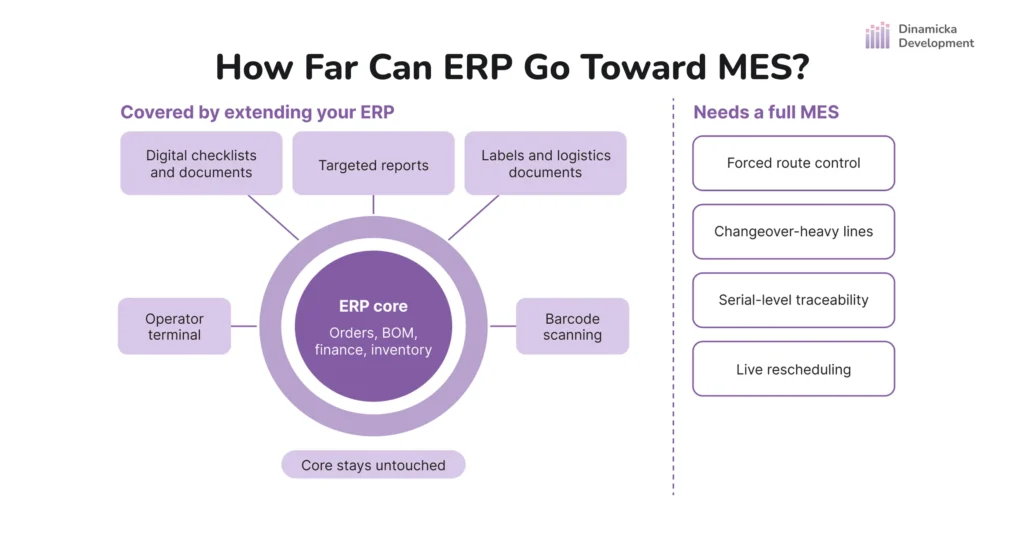
One important caveat: any extension needs to go through official APIs and external modules. Reaching directly into the core of an older ERP will only make future updates harder.
A Real Case: ERP-DMS from Dinamicka Development
So how do we actually tackle this kind of problem at Dinamicka Development? We build industrial-focused digital products – custom ERPs, MESs, CMMSs, DMSs, CRMs, web services, and specialized modules that plug the gaps in existing systems.
One of our delivered projects is a great example of industrial automation that didn’t require buying some heavy, expensive piece of software.
The Project Challenges
The client, a large Canadian premium meat producer, had an ERP that worked fine – orders were tracked, warehouse stock balanced out properly. But there was one sticking point. Putting together logistics and customs paperwork for exports of goods was perhaps the biggest time drain in the production and shipping process. Managers were spending hours manually filling out forms to match each country’s specific requirements. In addition, human errors from time to time led to delays at customs.
What We Provided
Dinamicka built a custom document management system (DMS) that takes over export paperwork and hooked it straight into the client’s ERP. The client’s ERP sends each export order to the platform through a REST API. The system then selects the certificates and customs forms required for the destination country, renders them from configurable templates, and takes every order through a four-stage review and approval flow until it is signed off and archived.
The Payoff
Prep time for a complete paper package dropped from several grueling hours down to about 15 minutes.
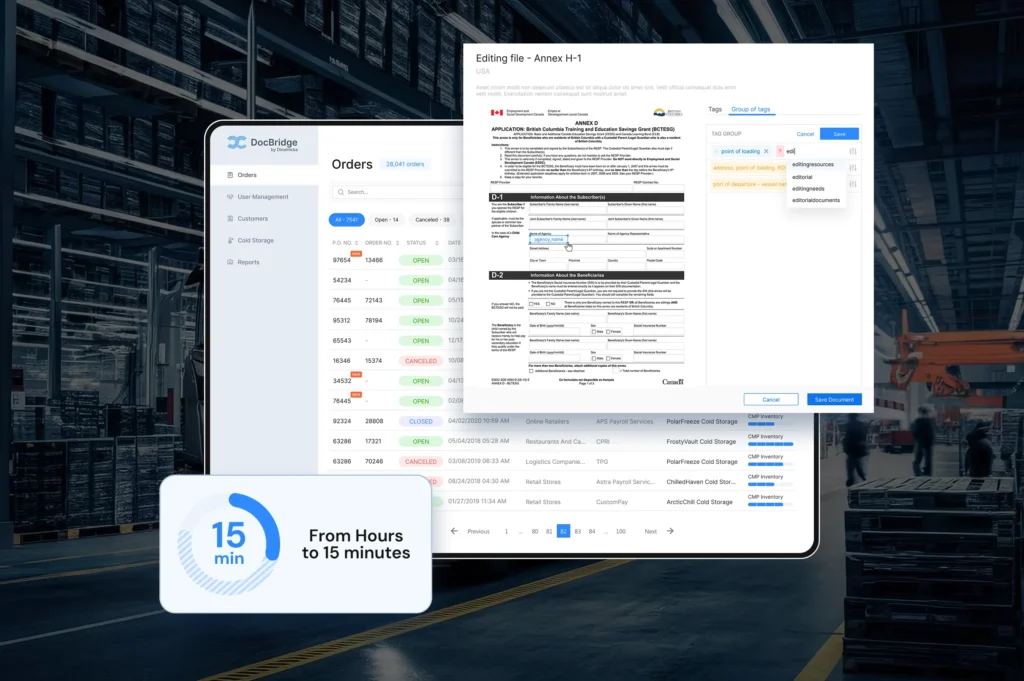
For more on this, see our case study on the document management system for a premium meat producer.
How Do You Automate Data Exchange Between ERP and MES?
Getting your business system and your shop-floor software talking to each other means clearly defining who “owns” each piece of data, picking the right interfaces, and planning for things to occasionally break.
Pick an Owner for Every Type of Data
The number one cause of integration chaos is trying to edit the same data in two systems at once. Every reference table needs exactly one source of truth.
- ERP should own: item master data, bills of materials (BOM), customer orders, units of measure, and financial reference data.
- MES should own: current equipment status, where WIP actually sits on the line, reasons for downtime, and detailed defect codes.
- Format synchronization: IDs need to match exactly. If a batch is called LOT-2026-05 in the ERP, MES has to use that exact same code – no shortening it, no reformatting on its own.
Choose How and When the Systems Talk to Each Other
Depending on your architecture and how fast you need data to move, you’ve got a few options.
- Connection methods:
- Pre-built connectors: Vendor-supplied modules. Quick to roll out, but you’re stuck with whatever structure they give you.
- API integration (REST/SOAP): The flexible, standard choice for modern, web-based systems.
- Middleware / ESB: A go-between layer that routes and transforms messages. Great for complex, sprawling IT setups.
- File exchange (JSON/XML): Passing structured files through secure folders. Mostly used for older, legacy systems.
- Sync modes:
- Event-driven: Data moves the instant something happens (scanning a finished batch updates WIP right away, for instance).
- Scheduled: Data moves in batches — hourly, or at the end of a shift.
- Hybrid: Critical status updates go through instantly, while summary material reports get sent on a schedule.
Important: Never set up a direct write straight into the ERP or MES database. That skips the built-in data integrity checks and can corrupt your data. Always go through official APIs or a proper service layer.
Learn more about our API development and integration services for connecting your systems securely.
Make Errors Visible and Fixable
Network hiccups or bad data shouldn’t bring everything to a halt:
- Strict validation on the way in. The integration layer needs to catch and filter out bad data before it ever reaches the target system.
- Queues and retry logic. ERP temporarily down, or stuck mid-update? MES shouldn’t lose a thing – it just queues up the messages and sends them through calmly once the connection’s back.
- Idempotent batches. If a message gets sent twice because of a connection hiccup, that shouldn’t mean materials get written off twice, or finished goods get logged into the warehouse twice over.
For older systems, it’s worth looking at software modernization to build a solid foundation for integration.
Test On One Process First
Don’t try to roll out integration across every department at once. Pick one basic process – passing a work order and getting confirmation of output, say. Get that flow running smoothly, check how it handles errors, make sure nothing’s getting duplicated, and only then start expanding.
Build a reliable data exchange between your systems.
Dinamicka’s engineers will help you set up secure and fast data exchange between your MES and ERP integration.
Get a Free ConsultationWhat Should You Weigh Up Before Deciding on Your Next Move?
Before you commit to buying software or building something custom, work through these seven questions:
- Where’s the real bottleneck? Which process causes the most delays or mistakes in your day-to-day work?
- What’s your current software actually capable of? Are you using every feature your ERP already has?
- Is the data even there? Is shop-floor info being captured digitally, or is it still going down on paper?
- Who owns the data? Which system is the master for item and order reference data?
- How fast does it really need to move? What data genuinely needs instant exchange, and what can wait for an end-of-shift summary?
- Are your systems ready for this? Do your current programs have open APIs or interfaces to connect through?
- Who’s going to support it? Who’ll be responsible for maintaining whatever solution or integration you build down the line?
If you’re seeing gaps between what’s planned at the business level and what’s actually happening on your shop floor, the Dinamicka Development team can help map out your system architecture and find the right fit. Check out our manufacturing software development work, or reach out to our technical team for a deeper look at your specific process.
FAQ
Can an ERP fully replace an MES?
No. ERP cannot fully replace an MES system, since they serve different functions. ERP can only cover some of the MES functionality by adding specific modules.
Can MES run completely without an ERP?
Yes, an MES can function fully without an ERP. However, in this scenario, its functionality will be limited to the production floor. Without an ERP, the MES will manage production lines but will remain “cut off” from the broader business.
Is SAP an ERP or MES?
SAP is an ERP system. Historically, SAP has built ERP systems adapted for managing finance, warehousing, logistics, HR, and enterprise planning.
Can data be exchanged between outdated ERP systems?
Yes, data exchange between a legacy ERP system and an MES is possible. In practice, most projects involving the implementation of new MES systems face this very issue. Regardless of how old your ERP system is, a technical solution can almost always be found.
Latest writings

Dinamicka Development an Offshore Software Development Company

How AI and Dynamic Routing Cut Costs and Optimize Logistics