

Custom Software Development Process: A Step-by-Step Guide for 2026

- What Is Custom Software Development?
- Why Understanding the Sequence of Processes Matters
- 7 Key Software Development Life Cycle (SDLC) Stages
- How Much Does Custom Software Development Cost in 2026
- Typical Custom Software Development Team Structure
- How Transparent Project Management Builds Trust and Efficiency
- Common Predevelopment Mistakes That Businesses Make
- Success Factors for a Software Development Project

Key Takeaways
- A successful product starts with a business goal, not code. If you skip the validation stage at the start, you are almost guaranteed to spend the budget on features that do not bring real value to the business or users. [Why Understanding the Sequence of Processes Matters]
- Discovery, design and development are a single cycle, not separate stages. Only this approach guarantees that the idea will not be lost during the transfer from designers to programmers, and the number of edits and revisions will be minimal.[Key SDLS Stages]
- The composition of the team directly affects the speed and quality of decisions. A clear division of roles is not bureaucracy, but a way to avoid bottlenecks and situations where everyone and no one are responsible for a critical task at the same time. [Typical Custom Software Development Team Structure]
- Transparent management is when you see problems before they become costly. Being honest builds trust and allows you to make informed decisions before the budget gets out of hand. [How Transparent Project Management Builds Trust]
- Trying to save on important stages, underestimating the complexity or choosing a contractor exclusively for the lowest price are typical mistakes that later cost many times more than the development itself. [Common Predevelopment Mistakes]
The custom software development process is a structured sequence of stages – from requirements analysis and architecture to coding, testing, and deployment – that transforms a business idea into a working product built around your specific workflows. As you dive into the custom software development process, as in any other business, you gradually learn about the entire “underwater world” of this process and learn through trial and error. However, when you have a “map,” this journey is completed faster and with fewer resources.
Statistics say that 70% of IT projects fail to meet their goals, are delivered late, or exceed their budget. This mind-boggling figure is not the result of a couple of bugs or missed deadlines. This means the use of the wrong approach to the software development process, the very root of the problem. The gap between a promising business idea and a working, scalable product is a canyon rather than a small step.
For founders, executives, and product managers, it can feel like walking through a complicated maze in the dark to understand how to carry out a successful custom software development solution. You know the goal: a proprietary system that perfectly solves your unique business challenges, unlike rigid, one-size-fits-all off-the-shelf software.
This custom software product development guide is not a technical manual for engineers. This is the same “map” for those who are on the other side of the negotiation table: business owners, executives, CTOs without a deep background in software engineering – people who make decisions about launching a project, approve budgets, and want to understand exactly what they’re paying for at every stage. We hope this guide will not only help you start off on the right foot, but will also help you decide whether to buy or build software and choose the right custom software development partner through your knowledge.
What Is Custom Software Development?
By definition, custom software development is the process of planning, designing, developing, testing, and integrating a software product that exactly meets the requirements and business objectives defined at the start of the project, whether it is an internal tool for a single team or a SaaS product for thousands of external users.
It’s not just about writing code. It’s structured planning, close collaboration between all stakeholders, transparency at every stage, and strategic alignment with what the business wants to achieve – whether it’s automating an internal process or building a product that will itself become a source of revenue. This requires a clear roadmap, a well-staffed team, and a deep understanding of the risks associated with every project.
Benefits of Custom Software Development
Opting for custom software product development provides strategic advantages over commercial off-the-shelf (COTS) software.
- Flexibility: Even within the same industry—say real estate or manufacturing—no two businesses operate the same way. An off-the-shelf solution—such as a CRM or ERP—might fit one company’s processes quite well while failing to meet half the needs of another, because each business has its own logic for working with customers, managing documents, or handling internal processes. Custom development removes this problem: the system is built around your company’s specific processes, rather than some generalized “industry standard.”
- Scalability: Custom software solutions are built to accommodate a business as it goes through different phases and expands. You’re not restricted by the vendor’s future plan or pricing scheme. Introducing new functionalities or dealing with a large spike in users is already considered in the architecture, which is why it will be a guarantee of success in the long run.
- Long-Term ROI: The initial outlay might be bigger, but the company will reap the benefits of custom software development over time in the form of a return on investment through reduced monthly/annual subscription costs, unlimited scalability of personnel within the system, and increased staff efficiency or process automation—for example, through the implementation of artificial intelligence agents.
The correct organization is what distinguishes a successful project from a failed one. The custom software development process is based on a clear phased approach, rather than on the chaotic work of a team of programmers—and this phased approach is called the software development life cycle (SDLC).
SDLC is a kind of blueprint that guarantees the quality of the final product. It is a coherent set of rules that describe how an idea turns into a reliable finished product.
Why Understanding the Sequence of Processes Matters
For a startup owner or business executive, understanding the phased nature of custom software product development is not a formality but a practical necessity: it is this understanding that allows a project to be completed on time and in line with expectations, rather than discovering a discrepancy between the plan and reality halfway through development. Below are the specific benefits of following a consistent, well-organized custom software development process, along with the risks a project faces when this structure is lacking.
Therefore, we emphasize the great importance of transparency and documentation. If every stage—from user stories to the final code architecture—is documented, this provides the project with a solid foundation and leaves the team with a clear trail of decisions that they can review at any moment during the project, even a year or several years later, when a new team takes over to maintain and modernize the software.
7 Key Software Development Life Cycle (SDLC) Stages
Today’s most efficient software development methods are built around the concept of the Software Development Life Cycle (SDLC). This concept can be implemented in numerous ways – from traditional sequential models to modern flexible and iterative methodologies like Agile and Scrum that are especially recommended for their rapid adaptation to changing requirements and situations.
In the classic SDLC model – most commonly associated with Waterfall – the project progresses in a strictly sequential manner: each stage must be fully completed before the next one begins. This linear structure allows for detailed, well-documented requirements upfront and a clear picture of scope before development starts. The trade-off is that Waterfall offers little room to course-correct once a stage is finished – if a requirement was misunderstood early on, that usually surfaces much later, when it’s already expensive to fix.
This is exactly why Agile and Scrum walk through the same seven stages below in short, repeated cycles instead of one straight line – catching those misunderstandings within weeks rather than months.
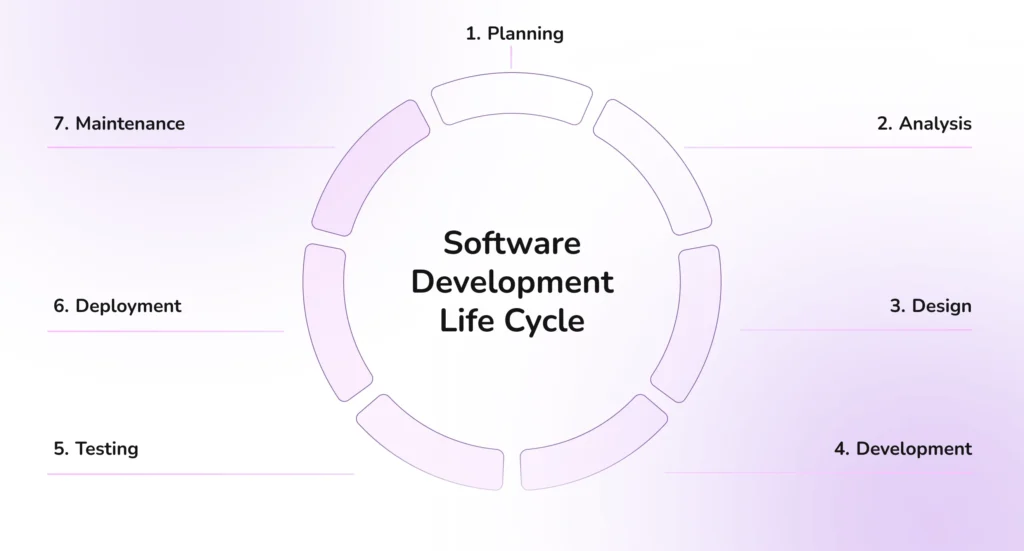
1. Planning and Project Discovery
This is the starting point where the very idea is evaluated, and the decision to launch the project is made. The team defines business objectives, rough scope, budget, and timelines. A project manager is assigned, key stakeholders are identified, and a high-level roadmap is created. For projects with unclear or vague initial ideas, a short discovery phase (1–4 weeks) may be included here to clarify feasibility.
Before moving from an idea to MVP development, startups should validate that the problem is real, the target users are willing to pay for a solution, and the proposed approach has market potential. See our guide on how to validate a startup idea before building an MVP for a practical framework and checklist.
The project discovery phase is especially important in MVP development for startups, as it helps to clearly define the project requirements and identify the core set of features for the future MVP.
Always necessary to go through the discovery phase in software development? Find out in our article.
2. Requirements Analysis
This is the most detailed and critical phase for the entire project. The team works closely with the client and end users to turn the rough idea into a precise, documented set of requirements. During this stage, the team analyses the market and competitors, identifies user stories, and gathers functional & non-functional requirements.
- Functional requirements explain what the system is required to do (for example, the system should allow users to change passwords, and the CRM must be connected to the payment gateway).
- Non-functional requirements establish performance standards (e.g., pages are supposed to load within three seconds, the system should have the capability of withstanding XSS attacks, and the system is expected to facilitate 10,000 users at a time).
As a result, the team has a complete Software Requirements Specification (SRS) or a prioritized product backlog — the main reference document for the rest of the project.
3. Designing the Architecture
A project has two fundamental aspects that determine the visual and structural plan: UI/UX design and system architecture. UI deals with the appearance of what users perceive, as well as the interaction, buttons, colors, and fonts. UX explains what users experience with the app – navigation, intuitiveness of the menu. In Figma, for example, wireframes and prototypes are used to test the UI and UX of the final product and make sure that it looks good and works well. System architecture decides exactly how the software components talk to each other.
The technology stack is selected at this stage and is determined by the project’s requirements, not the team’s personal preferences. If the priority is processing large real-time data volumes, this often means a stack like Node.js or Python together with PostgreSQL and Redis for storing data in cache. If, on the other hand, the focus is on a sophisticated, custom interface with high interactivity, the preference is often for React combined with a simpler backend that doesn’t take on unnecessary load. The right tech stack is always derived from the project’s requirements, not from what the team finds easiest to code.
A solid architecture defines the specific technology, the database design, and the system flow – often drawn out in flow diagrams – to build a base that is flexible enough to grow later.
4. Software Development
The architecture is ready, the design mockups have got the green light – now the actual coding phase begins. The tech stack was already selected in the previous stage, so the team immediately works within it. The front-end engineer implements the interface according to the approved design – screens, user interactions, responsiveness across different devices. At the same time, the backend engineer develops the architecture that ensures the operation of the internal logic of the system: data processing, storage in the database, and APIs through which the frontend and third-party services exchange data with the system.
Learn more about our custom software product development services.
In 2026, AI-assistant programming had already become a standard part of custom software product development for most teams. Tools like Claude Code, Cursor, or GitHub Copilot take on a significant portion of standard, repetitive tasks – template code, typical API integrations, routine test cases – freeing up developers to focus on what really matters: business logic and nuances specific to your product.
A GitHub Lab study in 2022 showed a 55% increase in coding speed among developers who worked in pairs with Copilot specifically on these types of tasks. But there’s an important caveat here: the more recent METR study from 2025 showed that in large, well-familiar codebases, the results are often the opposite – experienced developers spend just as much time validating AI-generated code as they previously did writing it manually.
This effect, it seems, depends not on the tool itself, but on how routine the task is and how well the developer knows the specific code – which confirms our approach: AI covers standard, repetitive areas, not business logic specific to your product.
The entire process usually follows the Agile method. Developers break the work into short cycles, called sprints, which last about one to four weeks. The goal isn’t to finish everything at once. It’s to deliver small, working chunks of software to get feedback fast. The key is the continuous delivery of small, functional pieces of software for testing and feedback.
Testing can take place in parallel. Even before the formal QA phase, developers individually check each new feature created during the sprint to ensure it meets the project requirements—this internal review eliminates a significant portion of obvious bugs from the QA team’s workload before the product even reaches them.
5. Product Testing (Quality Assurance)
The Quality Assurance (QA) phase is where the rigorous testing really happens. While the internal dev team catches simple errors as they code, the QA engineers have a much harder job – guaranteeing the product is 100% compliant before it ever sees the light of day. This formal phase is the firewall between a buggy draft and a perfect final solution. The solution must work perfectly – no matter what device or screen size a user has and what ways (usual and unusual) of using the product there are.
How to know the software is good? QA engineers use a specific mix of methods to catch bugs before you do:
- Unit testing checks the tiny parts – like individual modules – to make sure they work on their own.
- Integration testing checks how the system parts relate to each other. For instance, does the front-end interact with the database without any errors?
- During regression testing, engineers repeat the previous tests. This is to ensure that a new ‘fix’ does not unintentionally ruin something that was functioning well just the day before.
- User acceptance testing (UAT) is when you yourself participate. You measure the finished software against your business criteria and give the final approval before the release to the public.
- AI-assisted testing increasingly speeds up the first three methods above. AI tools can generate unit and regression test cases from existing code, flag anomalies in test results faster than a human scanning logs manually, and keep large regression suites up to date as the codebase changes. It’s a strong complement to UAT, not a replacement for it – deciding whether the software meets your business criteria still requires a person who understands your business, not just the code.
6. Deployment and Integration
Deployment is the big moment. DevOps engineers migrate the software from the testing environment to the actual production: a web server, the Shopify App Store, Google Play, etc. At this stage, most custom solutions will also connect with the existing infrastructure, such as internal databases or third-party APIs.
The idea is that nothing will break during data migration process. The teams implement an automated CI/CD pipeline, which stands for Continuous Integration/Continuous Deployment. Code updates are integrated securely and consistently, and the system is deployed to the live environment.
Releasing the product is not the end of the work – the monitoring phase after the launch starts. The team tracks real-time performance with the help of specialized tools. They detect missed bugs and integration issues to quickly find and correct them to keep the system stable.
7. Maintenance and Iteration
Software is ‘under development’ nearly all the time. Software maintenance and continuous iteration are the last phase of the SDLC.
Updates and bug fixes not only cut problems that might have been found post-launch but also confirm that the product remains compatible with the newest operating systems or third-party APIs.In reaction to user feedback and changes in the marketing arena, the team keeps on releasing new features, thus performing the product optimization for performance and market competition.
This requires long-term collaboration for the management of the evolution process. In such a case, it would be helpful to have a technical partner for outsourced software development and support continuously, as this would ensure the system keeps on delivering business value.
Are you ready to join a custom software development journey?
Dinamicka’s software experts will be your hassle-free guide through all the stages of the SDLC. They will be the ones to decrease the risks and also maximize the awesome potential of your product.
Book a Free ConsultationHow Much Does Custom Software Development Cost in 2026
After understanding the general sequence of processes, the question of the cost of custom software development in 2026 logically arises. Since the product is “custom”, the cost will always depend on specific variables – it is not a case where a single fixed figure is possible for everyone.
Drawing on our own experience combined with market data, below we will try to paint a clearer picture of what a system that truly meets your expectations, rather than a bare minimum, should cost. We’ll look at both typical price ranges based on complexity and the specific factors that eat into the budget the most in practice.
These figures are a rough estimate based on general market benchmarking for 2026. The actual cost of your project will depend on the team you work with and the region where they are based. For a closer look at what specifically drives MVP costs up or down, see our dedicated breakdown of MVP development pricing.
What Actually Drives the Price
There are countless factors that affect a project’s cost, but in our experience, it is just a few of them that most often and most significantly “eat into” the budget – and these are the ones you should focus on first.
Integration with External Services
The number and complexity of integrations between the future software and external services play a decisive role in determining the price of custom software.
- Simple, well-documented one-way REST integration (Stripe, standard CRM) – $1,500-$12,000, 1-2 weeks.
- Two-way synchronization with OAuth, webhooks, and data transformation – $5,000-$40,000, 2-7 weeks.
- Legacy systems, SOAP, real-time exchange, EHR or ERP with compliance requirements – $15,000-$50,000+, and often $60,000-$150,000 for enterprise scale. Plus annual integration support – another 15-25% of the initial cost.
Compliance Requirements
A separate expense item that is often underestimated at the start. HIPAA, GDPR, SOC 2, or PCI-DSS typically add 15-35% and sometimes up to 50% to the base project cost. The technical HIPAA safeguards alone–encryption, access logs, role separation, a signed BAA–are $15,000-$40,000+ separately, and a full compliance layer for a medium-complexity system is $60,000-$180,000. Separately, it is worth considering the integration with EHR via FHIR – this is typically $50,000-$150,000 and 2-6 months in itself.
Fixed-Price vs. Time & Material
This isn’t just a question of convenience; it directly affects the price. A fixed-price model offers predictability, but the client pays a 15–50% risk premium for it, and the scope must be defined in great detail before the project begins.
Time & Material is more flexible and better suited for products that evolve during development, but the risk of going over budget falls on the client – typical cost overruns also hover around 15–30%. In practice, many teams opt for a hybrid approach: a fixed overall budget with a flexible scope within each sprint.
Change of Requirements in The Middle of The Project
This is probably the most expensive and at the same time the most invisible factor. On the Time & Material model, scope creep typically adds 15-30% to the original budget. On fixed-price contracts, the contractor lays down this risk in advance – a 20-50% buffer in the price itself, or by documenting each change as a separate change order during development.
One factor that is increasingly coming up in discussions about pricing in 2026 is the AI-assisted custom software programming mentioned above. Where AI does speed up standard, boilerplate sections of code, it can slightly reduce the cost of typical system components – although, as we’ve already seen, the effect is far from universal and highly dependent on how boilerplate the task is.
Typical Custom Software Development Team Structure
You can never complain about the quality of a project if you have the right team in place. One of the most important steps that will guarantee the smooth collaboration and prompt delivery of the project is defining the full software development team’s roles and responsibilities.
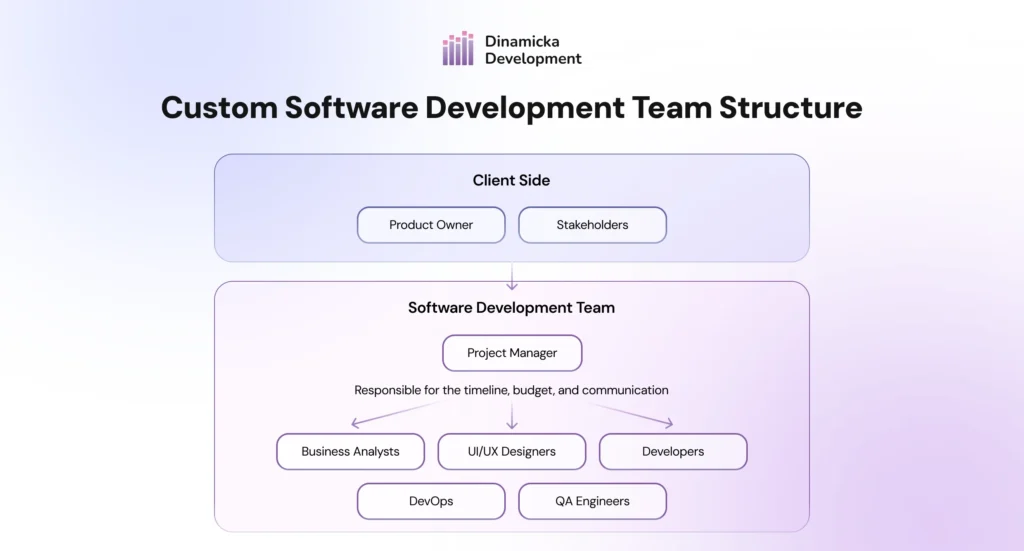
The proper distribution of roles’ responsibilities and collaboration is what provides the power, enabling the team to work very fast.
How Transparent Project Management Builds Trust and Efficiency
Transparency = trust. You should be aware of the investment’s exact purpose and the project’s development. Transparency of this kind, together with regular cooperation, is the success factor in the project.
Most of the current development teams use the Agile/Scrum frameworks. Agile is an adaptive and customer-oriented methodology that builds a transparent and cyclical organization.
Before each cycle (sprint), the development team prioritizes the features from the complete backlog in collaboration with the customer. They discuss it during daily scrums (stand-ups) – brief meetings that are held every day. Team members summarize briefly what they have done, what they are going to do, and what problems they may face. A project manager tracks the team’s performance and keeps you updated all the time. As a client, you will be able to see everything that is being done regarding the features. The team reports on their work after each sprint – they demonstrate new features and explain how they function.
Project management is based on the principle of transparency: to build trust and to show you where your investment is going.
Tools for Transparency
Team members use digital tools that provide a common foundation for cooperative work and sharing ideas. Through monitoring tools such as Jira and Trello, you can check the status of tasks (who is doing what) and get real-time updates on what is being developed at this moment. Slack is the platform for quick questions – it is way faster than waiting for incoming emails. When members need face-to-face time for demos, they switch to Zoom or Teams. For storing technical docs, software development firms prefer central hubs like Confluence.
This organized system keeps communication and discussions open. It makes sure you always know the project status and can play an active part in the process.
Common Predevelopment Mistakes That Businesses Make
Sadly, as we stated at the outset, 70% of digital products never even reach the market. To help you avoid becoming one of those statistics, we will cover common mistakes (obvious and not-so-obvious) that can stall your custom software project. Avoiding them is the first step. This will lessen cost overruns and project delays.
Poor Scoping and Requirements
A client may start a project with only vague ideas – e.g., “a nicer website.” They should instead prioritize the user experience. They need articulated user stories. (Example: “Our real estate website must show dynamic property listings that are connected to our database.”)
If you skip the deep planning, problems will pop up once the coding starts. This leads to “feature creep” – where the project keeps growing uncontrollably. That is a budget killer. To protect your money and your timeline, you have to pay close attention to the details early on. Don’t settle for vague ideas.
Unrealistic Deadlines
Everyone wants to rush the launch. It is a common mistake to set strict, impossible deadlines. But rushing just forces the team to cut corners, which means lower-quality work.
The fix? Ask your partner for an honest time estimate based on real analysis. And – this is very important – trust their judgment, even if the timeline is longer than you hoped.
Skipping the Discovery Phase
Skipping the discovery stage and treating it like a boring formality is dangerous. If the requirements are messy or incomplete, your partner strongly recommends a full product discovery phase. If you skip this analysis, thinking you are saving time, the project often changes drastically later.
This initial phase is a reality check. It confirms if the tech is possible and if the market actually wants it. This step saves you hundreds of hours of expensive rework later. It is your safety net against failure.
Underestimating Quality Assurance (QA)
Treating testing as “optional” – or leaving it until the last minute – is a recipe for disaster. You risk launching a broken product and missing your dates.
Good QA engineers don’t just check boxes but hunt for bugs from day one. You need a detailed test plan to catch issues early, so you end up with a stable, reliable product.
Success Factors for a Software Development Project
Want to be the ideal partner for a custom software development company? Come prepared. Being ready for that first meeting changes everything – it turns uncertainty into a strategic partnership. Here is what you should have ready to start on the right foot:
- Crystal-Clear Business Goals: Be exact about why you are building this. Is it to automate a manual task? Increase sales? Start a new business line? Be specific.
- Clear Priorities: You probably have 100 features in mind. You need to cut that down to the absolute must-haves for the MVP development (Minimum Viable Product). Know what is essential (P1) and what can wait (P2). This helps the team focus on what matters first.
- Preliminary Budget: Have a realistic budget range in mind based on some industry research. This lets your partner recommend the most appropriate and cost-effective tech stack and scope.
- Timeline Expectations: Even if you have a desired launch date, be prepared to discuss and adjust it based on the technical scope that will be established during the discovery phase. Good software delivery management puts quality (over arbitrary deadlines) as the top priority.
- Key Stakeholder Availability: Determine which internal people (executives, end-users, subject matter experts) are strictly necessary to take part in the discovery and requirements phases. Their time is of top priority for the success of the project.
Want to transform your idea into a finished product?
Reach out to Dinamicka for a free consultation.
Request a Discovery SessionLatest writings

How to Automate Manufacturing Documentation Using ERP Data

How AI and Dynamic Routing Cut Costs and Optimize Logistics
